MT-01P 10m Laser Rangefinder — User Manual
The MT-01P is a compact 10 m laser rangefinder for drones — the distance half of the MTF-01P without the optical-flow camera. It outputs over UART or I2C (switchable), speaks MAVLink, MSP and Micolink, and works with ArduPilot, PX4, INAV and FMT. Point it down for precise altitude hold and fixed-wing auto-landing, or sideways for obstacle detection — on I2C, ArduPilot can run several MT-01Ps at once for multi-direction avoidance.
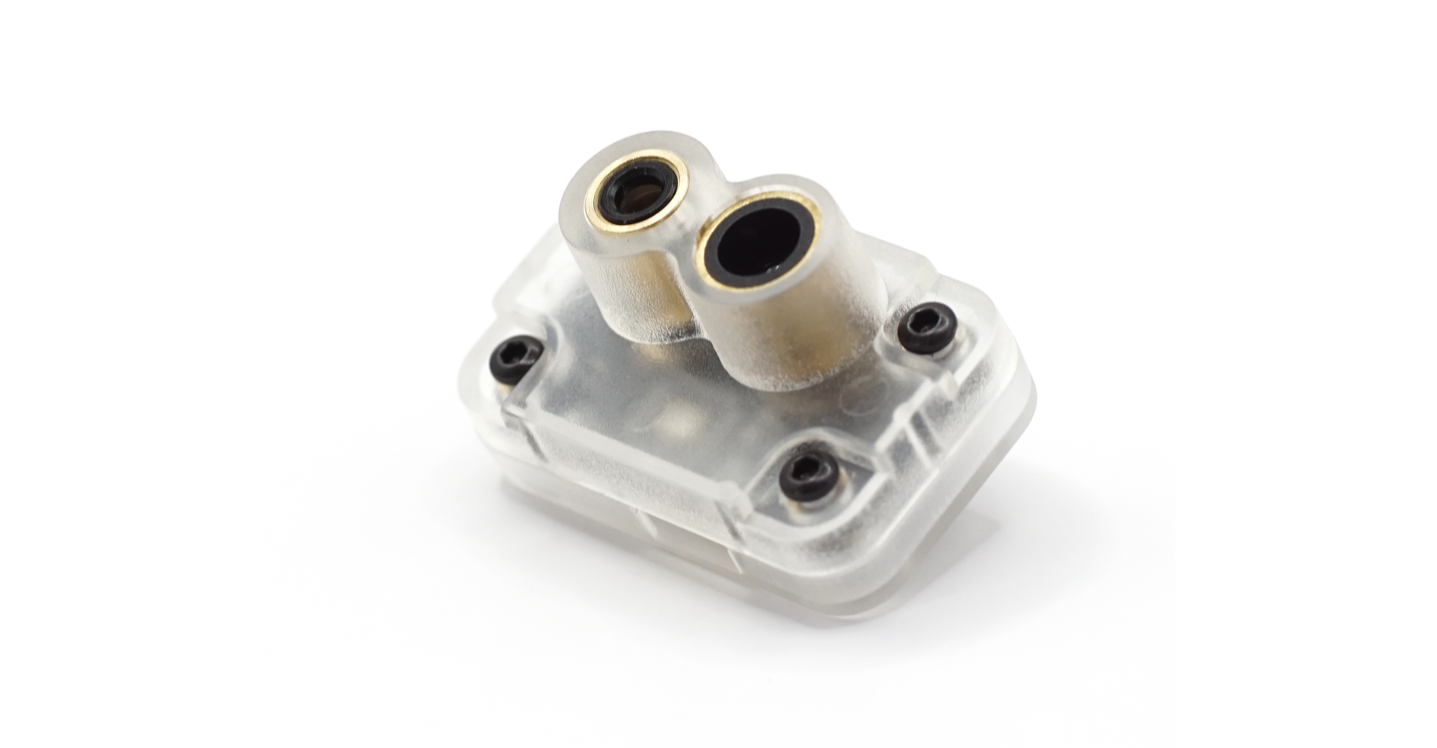
Where to buy
- Robofusion store (ships from Canada — free Canada-wide shipping): MT-01P 10m LiDAR Range Sensor
A rangefinder measures one thing: distance along its beam. Pointed down, it gives the flight controller a precise height above ground — that's rock-solid altitude hold and terrain following, but the aircraft can still drift sideways. Horizontal position hold without GPS additionally needs an optical-flow camera — that's the MTF-01P / MTF-02P family. Buy the MT-01P when you need distance only (altitude, landing, obstacle avoidance) and the flow sensors when you need GPS-free hovering.
Specifications
| Item | Specification |
|---|---|
| Range | 0.02–10 m @ 90% reflectivity (1 klux) · 0.02–7 m @ 70 klux |
| Range accuracy | 4 cm (0.02–2 m) · 2% (>2 m) |
| Light source | Laser, 808 nm |
| FOV | 1.5° |
| Interface | LVTTL (3.3 V) UART, 115200 baud · switchable to I2C |
| Data rate | 800 / 400 / 200 / 100 / 50 (default) / 25 / 10 / 5 Hz |
| Supply | 5 V, ~100 mA average |
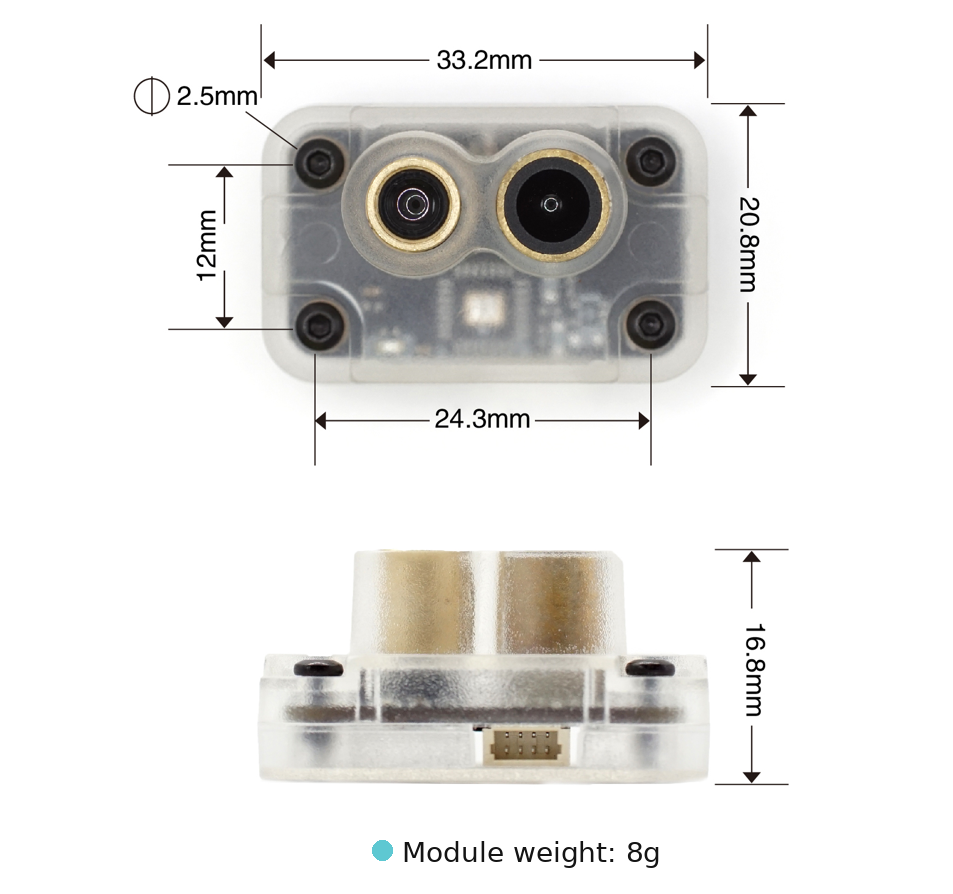
| Mounting / size / weight | 24.3 × 12 mm Φ2.5 holes · 33.2 × 20.8 × 16.8 mm · 8 g |
10 m is measured against a 90%-reflectivity target in mild light (1 klux). Two things shrink it in the real world: bright sun (7 m at 70 klux) and dark or vegetated ground — dry grass and asphalt reflect far less than 90%. Indoors and over pavement you'll see close to spec; over dark ground in summer sun, plan conservatively and check your logs. Also note the data-rate trade-off: higher output rates shorten the usable range and add noise — the 50 Hz default is the right choice for flight controllers.
Dimensions
- Mounting holes: 24.3 × 12 mm, Φ2.5 mm
- Module (with case): 33.2 × 20.8 × 16.8 mm, 8 g
Interface & wiring
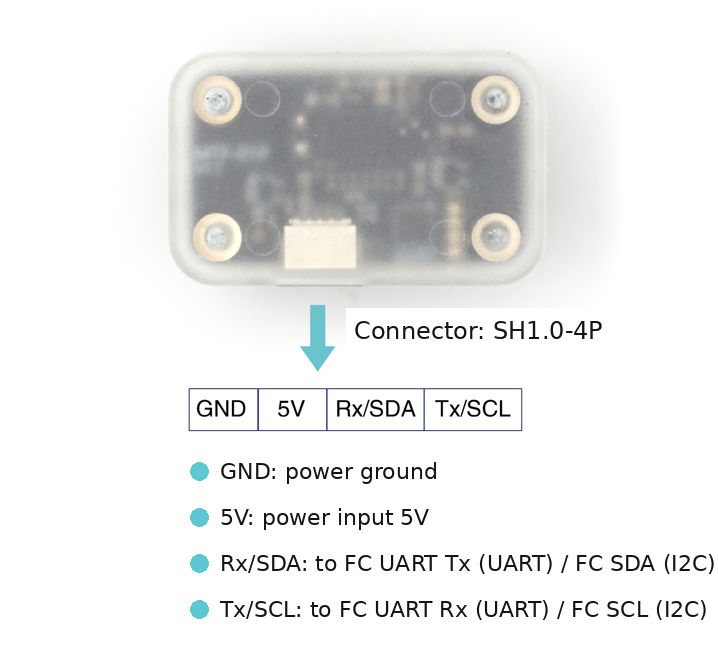
Same 4-pin layout as the MTF family: GND, 5V, RX, TX. For UART, cross-connect as always — sensor TX → flight controller RX, sensor RX → flight controller TX. In I2C mode the same two signal pins become SCL / SDA (straight-through: SCL→SCL, SDA→SDA).
Protocols & the MicoAssistant tool
In UART mode the MT-01P offers three protocols, switchable with MicoAir's MicoAssistant configuration software:
- MAVLink (default) — ArduPilot and PX4. Most users never need to change anything.
- MSP — INAV.
- Micolink — FMT, or your own custom integration (protocol definition).
I2C mode is switched the same way (or order the I2C version). Two hard requirements:
- ArduPilot 4.5.0 or newer only — PX4/INAV do not support the MT-01P over I2C.
- The bus needs pull-up resistors. The module has none on board; the flight controller's I2C port normally provides them.
Once in I2C mode the sensor no longer talks serial, so MicoAssistant can't see it the normal way. The trick: connect your USB-TTL adapter to the PC first, open MicoAssistant and connect to the port at 115200 — then plug the MT-01P into the adapter. MicoAssistant will identify it. If plugging the sensor in resets the adapter, a large capacitor across the adapter's 5 V output usually cures it.
ArduPilot — UART setup
Firmware 4.1.0 or newer. Wire the sensor to any spare UART (TELEM1/2 …), TX/RX crossed, and set:
SERIALn_BAUD     = 115
SERIALn_OPTIONS  = 1024   (Don't forward — ArduPilot 4.6 and earlier, see note below)
SERIALn_PROTOCOL = 1
   (n = the serial port you used)
RNGFND1_TYPE     = 10     (MAVLink)
   — reboot or refresh parameters —
RNGFND1_ORIENT   = 25     (Down — must match the module's own orientation setting; both default to Down)
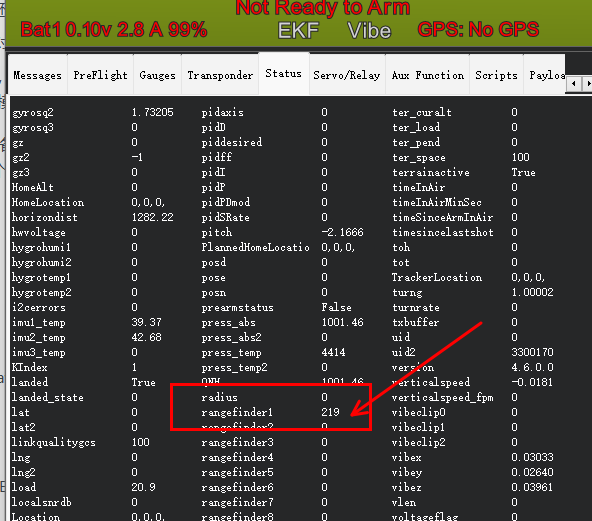
Reboot; the Status tab in Mission Planner should now show a live rangefinder1 value.
"Don't forward" is no longer SERIALn_OPTIONS = 1024. It moved to bit 1 of MAVn_OPTIONS (value 2), where MAVn counts MAVLink ports in order: USB (SERIAL0) is MAV1, the next serial port set to a MAVLink protocol is MAV2, and so on. Upgrading from 4.6 carries the setting over automatically. It is only a refinement that keeps the sensor's traffic off your telemetry link, so the sensor works without it.
ArduPilot — I2C setup (single or multiple sensors)
Switch the module to IIC_NOOPLOOP interface mode in MicoAssistant (or buy the I2C version). The module's TOF_ID parameter sets its bus address: ID 0 → address 0x08, ID 1 → 0x09, and so on — give every module on the same bus a different ID.
Wire SCL→SCL, SDA→SDA, then in ArduPilot:
RNGFND1_TYPE   = 40      — reboot / refresh —
RNGFND1_ADDR   = 8       (module with TOF_ID 0)
RNGFND1_ORIENT = 25      (Down for altitude; 0 = Forward, 6 = Left … for avoidance)
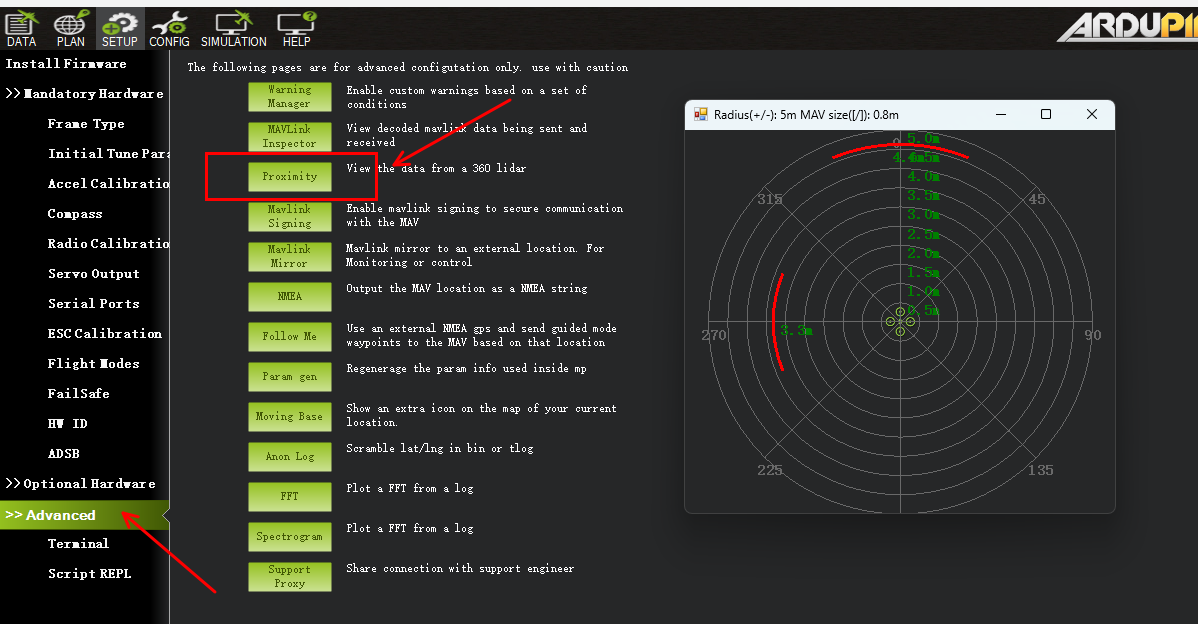
A second sensor is just RNGFND2_TYPE 40, RNGFND2_ADDR 9 (its TOF_ID set to 1), and its own orientation. Both distances appear in the Status tab, and the Proximity view visualizes them around the aircraft:
PX4 — UART setup
PX4 1.14 and newer:
MAV_1_CONFIG    = TELEM n     — reboot —
MAV_1_MODE      = Normal
SER_TELn_BAUD   = 115200 8N1
EKF2_RNG_CTRL   = Enabled
EKF2_HGT_REF    = Range sensor
PX4 1.12–1.13: same MAV_1 / baud settings, then EKF2_RNG_AID = Range aid enable and EKF2_HGT_MODE = Range sensor.
Reboot and check QGroundControl's MAVLink Inspector for the DISTANCE_SENSOR message. The message rate shown in QGC is set by the flight controller and the link speed — it is not the sensor's data rate, so don't worry if it looks low.
FAQ
No rangefinder data in the ground station?
Check, in order: TX/RX actually crossed (UART mode); the right SERIALn_ port configured; module protocol matches the firmware (MicoAssistant shows it — should be mav_apm for ArduPilot/PX4); RNGFND1_ORIENT matches the module's orientation setting (both default Down — if either was changed, ArduPilot silently ignores the sensor).
Can it do terrain following?
Yes — with the sensor facing down and configured as above, ArduPilot's surface tracking (RNGFND + altitude-hold modes) and PX4's range-height EKF reference both work. Keep the 10 m envelope and ground reflectivity in mind.
Does it work over water or glass?
Poorly — like all single-point laser rangefinders. Still or clear water absorbs and refracts the 808 nm beam, and glass returns confusing reflections. Expect dropouts and don't rely on it as the sole height source over water.
Related
- MTF-01P — Optical Flow + 12m LiDAR User Manual — add horizontal position hold
- MTF-02 / MTF-02P — User Manual
- Optical Flow Setup Guide — vibration, EKF and tuning fundamentals that apply to rangefinders too
- MicoVIO — Visual-Inertial Odometry Sensor — full GPS-free position, velocity and attitude with a ToF rangefinder built in
- MicoAir H743 V2 — User Manual
Written and maintained by the Robofusion engineering team.